![VERSO_Logo-1.png]](https://helpdesk.verso.de/hs-fs/hubfs/Globale%20Design-Elemente/VERSO_Logo-1.png?height=50&name=VERSO_Logo-1.png)
The Accounting tab in the left navigation bar contains the Reports sub-tab. Here you can create new reports for calculating the emissions of a PCF and view and edit existing reports.
Report overview

The first column of the overview shows the title of each report. To the right of this is the report type. In addition to Product Carbon Footprints (PCF), reports on Corporate Carbon Footprints (CCF), Event Carbon Footprints (ECF) or Life Cycle Assessments (LCA) may also appear here.
The Status column is currently always In Progress for PCF. In future, it will indicate whether the report is still being processed (In Progress) or has already been completed (Published). The From and To columns indicate the period during which the input data for the product was collected and accounted for. The CO2e (Total) column is empty for the PCF as there is no summation of emissions across locations. The last two columns show who last modified the report and when the change was made.
Filter functions
To search for specific reports, the checkboxes can be used to select from four report types (CCF, PCF, ECF, LCA). In addition, the filter Status and Year are available. With the Status filter, you can search for reports that are In Progress. The options In Review, Finished or Published currently exist only in the CCF. The Year filter allows you to narrow down the reporting period by either double-clicking on a year in the annual overview or selecting two different years. Once the filters have been set, only reports that match the selected criteria will be displayed.

Create a new report
A new PCF report can be created in two ways:
1. Via the report overview
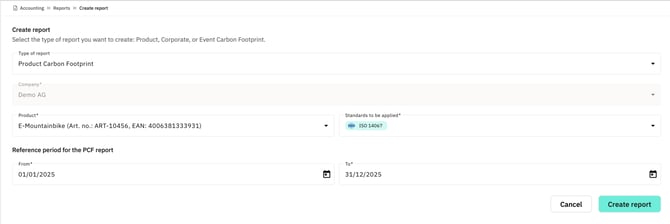
To create a new report, first click the plus button at the end of the table. In the Type of report field, select Product Carbon Footprint. The company will be filled in automatically. Then, under Product, select a previously recorded product from the product list, and specify the relevant standard in the Standards to be applied field. Here you can choose between ISO 14067, Catena-X, PACT and TfS (Together for Sustainability). Please note that you can only ever select one standard at a time. After that, define the desired reference period within which the input data for the product will be recorded and used for the calculation. Clicking the Create Report button will create the report, which will then appear directly in the report overview.
2. Directly from the product list
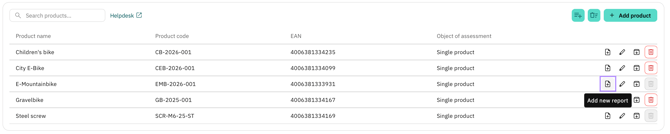
Alternatively, a new PCF report can also be created directly from the product list. To do so, click the Add new report button in the respective product row. You will then be taken directly to the input screen for creating a new report. The selected product as well as the report type Product Carbon Footprint (PCF) are already prefilled. This allows new reports to be created faster and with fewer manual inputs.