![VERSO_Logo-1.png]](https://helpdesk.verso.de/hs-fs/hubfs/Globale%20Design-Elemente/VERSO_Logo-1.png?height=50&name=VERSO_Logo-1.png)
TABLE OF CONTENT
I. Adding individual components
I. Adding individual components
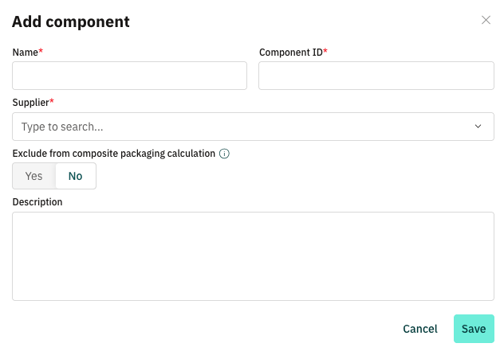
1. Click on PPWR > Components > Add component
2. Fill in the form: Enter the name of the component and the component ID, as well as which supplier you source the component from. If you manufacture the component yourself, you can select "own company". Optionally, you can choose whether the component should be excluded from the composite packaging calculation (coming soon) and add a description of the component.
3. Click on "Save".
II. Bulk upload via Excel
- Click on PPWR (1) > Components (2) > Upload components (3)
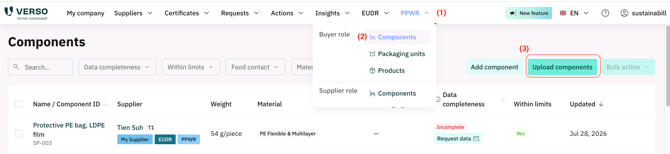
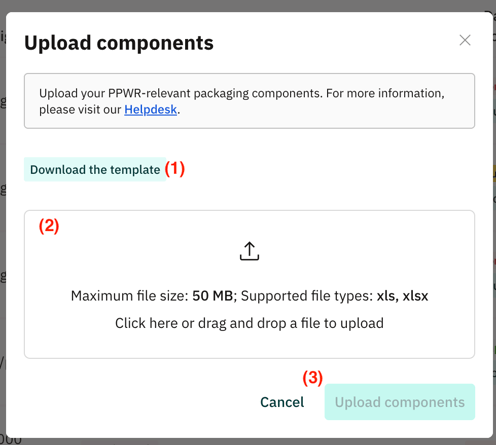
- Click on "Download the template" (1) to download the Excel template.
- Fill in the Excel template. In the Read-Me tab, you will find detailed instructions on the columns to be completed.
- Then upload the completed template (2) and click on "Upload components" (3).
III. Component-Tags
You can assign individual tags to your components.
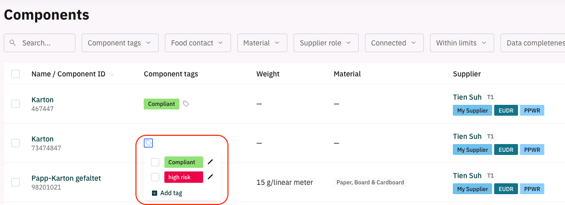
- Navigate to PPWR → Components.
- For the desired component, click on the tag icon in the Component tags column and add the tags you want. You can also assign tags in bulk when uploading components via Excel by entering the desired tags in the Tags column — a tag name that does not yet exist is created automatically.
You can also assign tags in bulk when uploading components via Excel by entering the desired tags in the Tags column — a tag name that does not yet exist is created automatically.