![VERSO_Logo-1.png]](https://helpdesk.verso.de/hs-fs/hubfs/Globale%20Design-Elemente/VERSO_Logo-1.png?height=50&name=VERSO_Logo-1.png)
The Document Agent lets you automatically extract data from invoices, receipts, and reports. Based on the uploaded documents, the AI suggests matching activities for your CCF report. You review the suggestions and apply only what fits.
Data processing consent
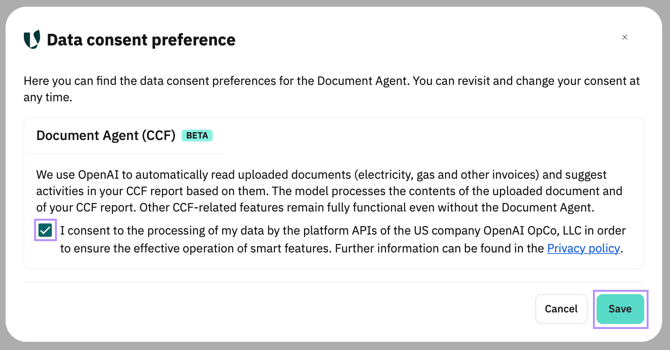
To use the Document Agent, you need to give your consent to data processing once.
- Open the "Document Agent" tab in the CCF report.
- Click "Data processing consent".
- Activate the checkbox in the "Document Agent (CCF)" card and click "Save".
- The Document Agent is now available. You can withdraw your consent at any time via the same link.
How the Document Agent works
- Open the "Document Agent" tab in the CCF report.
- Upload a document using the paperclip icon or by dragging and dropping it into the input area. Supported formats: PDF, PNG, JPG, JPEG, WEBP.
- Optional: Enter a question or note in the text field.
- Click "Send". The AI analyses the document.
- The "Suggested activities" card shows the detected consumption values as a table.
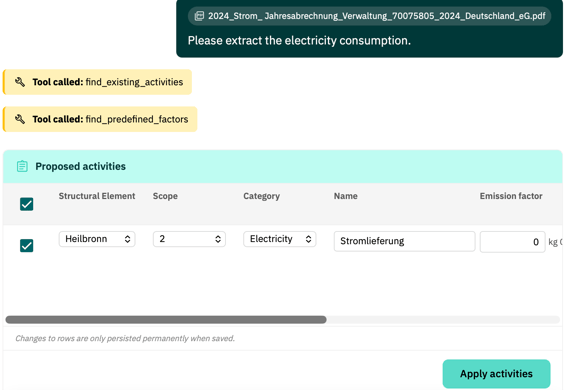
- Review the suggestions. You can edit the following fields before applying: structural element, scope, category, name, emission factor, value, accuracy, comment.
- Select the checkbox in a row or use the top-level checkbox to select all activities.
- Click "Apply activity" or "Apply activities".
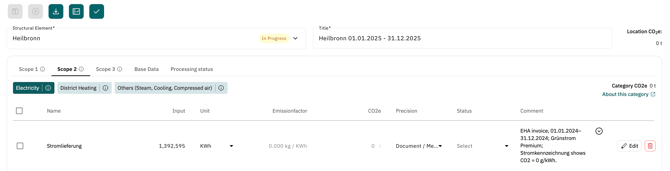
The activities are added to the appropriate location in the CCF report.
Important to know
- You can upload up to 5 files at a time. If you select more than 5 files, an error message is shown.
- The unit and emission factor unit fields are read-only and cannot be edited.
- Changes to table rows are only saved permanently when you click "Apply".
- Already applied activities are not automatically overwritten if you apply the same activity again.
- The chat history is deleted after 24 hours.
Withdrawing consent
If you withdraw your consent, the Document Agent is locked. The existing chat history remains visible but can no longer be used. Activities already applied to the CCF report remain unchanged.