![VERSO_Logo-1.png]](https://helpdesk.verso.de/hs-fs/hubfs/Globale%20Design-Elemente/VERSO_Logo-1.png?height=50&name=VERSO_Logo-1.png)
All report-relevant information required to create a LCA report is recorded in the Base data tab.
The section is divided into two sub-tabs:
1) General information
2) Report configuration
1) General information
Product description:
To calculate the LCA, a concise product description is first recorded that clearly identifies the product under consideration.
If a product description has already been maintained in the product list, it is automatically transferred when creating a new LCA report. The description can be adjusted within the report if needed. Changes to the product description in the LCA report do not affect the product description in the product list or in other LCA reports.
Selecting and justifying the system boundary:
The next step is to define the system boundary. This is a free-text field; typical system boundaries may include, for example:
- cradle-to-gate (A1-A3)
- cradle-to-practical-completion (including A4, A5)
- cradle-to-grave (including B and C)
- cradle-to-cradle (including D)
Please also provide a justification for the selected system boundary. This should include an explanation of why specific life cycle stages were excluded, if applicable.
Definition of the reference value:
The reference value is defined after the system boundary has been defined.
- Declared unit: It describes the product independently of a defined use, e.g. 1 kg of sheet steel. It is particularly useful for products that do not (yet) have a clearly defined use, e.g. intermediate products. This makes it possible to communicate the environmental impact if the end product has not yet been defined or enables different uses.
- Functional unit: It describes the specific benefit of the product in clearly defined, quantifiable units, e.g. the transport of a person over 100,000 km in a car with an internal combustion engine, whereby the car represents the product under consideration. The use of the functional unit thus enables a transparent, consistent and comparable assessment of environmental impacts over the entire life cycle, especially for products with the same benefits (e.g. electric car and combustion engine).
Definition of the reference flow:
The reference flow is only required when using the functional unit. It describes the product quantity required to fulfil the benefit defined in the functional unit. This means that all required input and output data in the life cycle can be related to this benefit.
For a car with an internal combustion engine, the reference flow could be as follows:
The quantity of vehicle and operating materials required to fulfil the transport of one person over 100,000 km. This includes, among other things:
- The vehicle (e.g. 1,400 kg of material input)
- The fuel consumption over 100,000 km (e.g. 7,000 litres of petrol)
- Maintenance and spare parts (e.g. 25 litres of oil)
- End-of-life treatment (1 vehicle)
All these input parameters must be taken into account when recording consumption and emissions data in order to calculate the full LCA for the functional unit. If this LCA is then compared with that of another vehicle, e.g. the LCA of an electric car, its reference flow must be determined in the same way, based on the same functional unit:
- The vehicle (e.g. 1,400 kg material input, plus material for battery if applicable).
- Electricity consumption over 100,000 km (e.g. 15,000 kWh of electricity)
- Maintenance and spare parts (e.g. battery replacement)
- End-of-life treatment (1 vehicle)
Important: All consumption data must always be recorded in relation to the selected reference value and reference flow. A comparable, transparent assessment of the environmental impact of different products is only possible if the reference value and reference flow are defined uniformly for different PCFs.
Specification of the number and unit of the product quantity under consideration:
The number and unit of the product quantity under consideration is now recorded. Units can be selected according to weight (g, kg, t, short-ton, lb), volume (ml, L, m3, scf, gal, bbl), area (m2, ha, km2, ft2), length (m, km, ft, mi, nmi, pkm, pmi, tkm, tmi, short-ton-mi, TEU-m, TEU-km, TEU-ft, TEU-mi, TEU-nmi), energy (kWh, MWh, Wh, GWh, MJ, GJ, TJ), currency (EUR, USD), time (second, minute, hour, year) or other (nights, number, %, Megabit.s).
Information on the total production volume of the product in the reference period:
The total production volume of the product in the reference period is also recorded. This information is essential for scaling the emission values to the total production output. However, the information is not included in the calculation of total environmental impacts.
Comments on the LCA report:
Finally, there is the option to enter additional comments, explanations or methodological notes on the LCA report in the Comments field. This text is also displayed in the final PDF report (coming soon) and can help to make the accounting more comprehensible.
2) Report configuration
2.1) Purpose of report configuration
The report configuration allows you to flexibly adapt the structural setup of a Life Cycle Assessment to the actual processes within your company.
The defined stages and sub-stages determine:
-
where activities are entered in the Data tab and
-
how they are displayed in the Analysis section (coming soon).
For example, the production stage can be divided into specific process steps to represent and evaluate emission sources more precisely.
The report configuration allows you to:
-
model the report structure flexibly and in a company-specific manner,
- create and edit custom sub-stages
2.1) Where is the report configuration set up?
The configuration of stages and sub-stages takes place in the Base data section of the LCA report. There, it can be defined which stages and sub-stages should exist within a LCA.

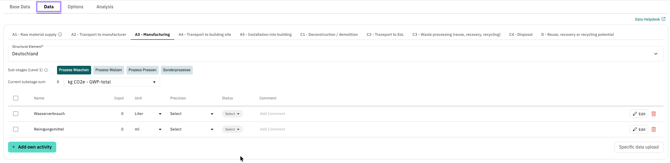
This structure is automatically transferred to the Data tab and forms the basis for entering activities.
Note: Only users with the Administrator role can view and modify the report configuration. All other users work in the Data tab with the structure that has been set up.
2.2) How is it configured?
Creating stages and sub-stages:
When creating a new report, all stages and sub-stages are automatically freely configurable via the plus button or directly via “add stage".

Once a stage has been created, sub-stages can be added on level 1 and level 2. Sub-stages provide an additional level of detail and enable more precise structuring of complex processes or data entries.
In addition, descriptions can be assigned to all stages and sub-stages. These descriptions can be found in the data tab behind the respective stage or sub-stages as an info icon with a tooltip.
.png?width=670&height=156&name=Bildschirmfoto%202026-04-28%20um%2010.51.51%20(2).png)
Note: If you add sub-phases even though activities already exist at the phase level, these will automatically be assigned to the newly created sub-stage. This automatic assignment cannot be undone. Subsequent relocation is then only possible via CSV download and upload.
Editing or deleting stages and sub-stages:
Both editing and deleting stages and sub-stages is done via the pencil icon.

When you delete a stage or sub-stage, all activities contained within it are completely deleted. If a stage or sub-stage at level 1 is deleted, all associated sub-stages are also deleted. This process cannot be undone. It is therefore recommended that you complete the stage and sub-stage structure before entering the activity data.
The system will display a warning message before deletion to remind you of this.
Rules for naming and structure:
-
The name of an individual stage must be unique.
-
The name of an individual sub-stage must be unique within a lifecycle phase.
-
Structural changes become effective immediately in the Data tab.
If these rules are violated, an error message appears and the new stage or sub-stage cannot be saved.