![VERSO_Logo-1.png]](https://helpdesk.verso.de/hs-fs/hubfs/Globale%20Design-Elemente/VERSO_Logo-1.png?height=50&name=VERSO_Logo-1.png)
Depending on the selected sub-stage, various options are available for recording and calculating consumption data.
Add own activity
One option is to create an individual activity using the "+ Add own activity" button. This allows great flexibility in mapping processes. After clicking, an input mask opens with the following sections: General information, Emission factors and Data source information.
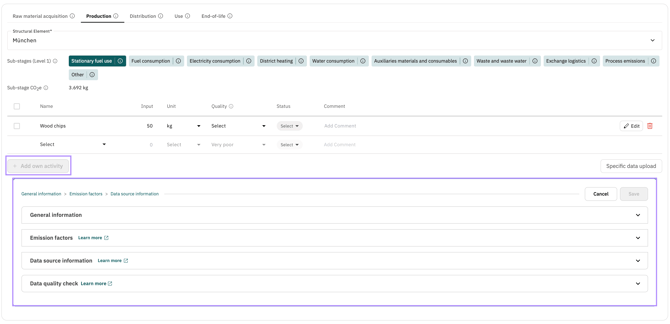
1. Entering own emission factors
You have the option to enter an emission factor manually, e.g. from supplier data or a utility bill. Four emission factors are available for this purpose. The difference between the four factors can be illustrated using the example of a wooden pallet.
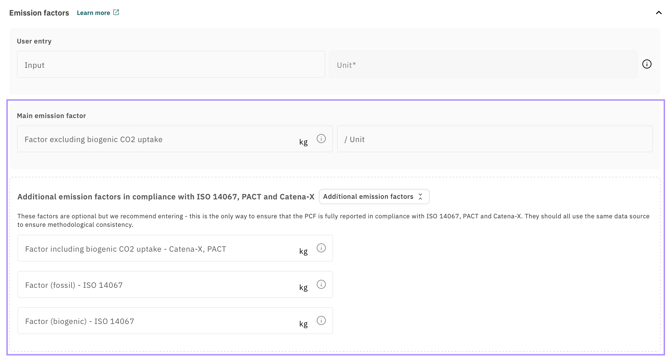
Factor (excl. biogenic CO₂ uptake)
This is the main emission factor, previously referred to as "Factor (total)", and forms the basis of all previous PCF calculations.
This factor includes all emissions that arise along the life cycle of a product – fossil emissions (e.g. from energy and transport), biogenic non-CO₂ emissions (e.g. biogenic methane) and land use changes. Biogenic CO₂ uptake by biomass is not included.
This factor must be reported in accordance with PACT and Catena-X.
Example wooden pallet: The factor includes emissions from sawing, transport and machinery during the production of the pallet – i.e. everything that is released as CO₂ into the atmosphere. The fact that the tree absorbed CO₂ during its growth is not yet taken into account here.
Factor (incl. biogenic CO₂ uptake)
This factor extends the Factor (excl. biogenic CO₂ uptake) by the biogenic CO₂ uptake through biomass – i.e. the amount of CO₂ that is absorbed from the atmosphere during plant growth and stored in the product. For products with a high wood or biomass content, this factor can be negative – meaning the product has bound more CO₂ than it has emitted on a net basis.
The factor (incl. biogenic CO₂ uptake) must be reported as a second overall value in accordance with PACT and Catena-X, and forms the basis for calculating the Data Quality Rating (DQR) and the Primary Data Share (PDS).
Example wooden pallet: A wooden pallet stores the carbon that the tree absorbed from the atmosphere during its growth. This stored carbon outweighs the emissions generated during the production of the pallet – the factor is therefore negative.
Factor (fossil)
This factor indicates exclusively the share of emissions attributable to fossil sources – e.g. the combustion of petroleum, natural gas or coal along the production pathway. It is a sub-value of both the Factor (excl. biogenic CO₂ uptake) and the Factor (incl. biogenic CO₂ uptake).
According to ISO 14067, the Factor (fossil) must be reported separately.
Example wooden pallet: The fossil share arises e.g. from diesel consumption by sawmill machinery or fuel used by transport vehicles. Biogenic emissions are not included here.
Factor (biogenic)
This factor indicates the net biogenic emission factor – i.e. the sum of biogenic emissions and biogenic CO₂ uptake. For products with a high biomass content, this value is typically strongly negative, as the CO₂ uptake through biomass significantly outweighs biogenic emissions.
According to ISO 14067, the Factor (biogenic) must be reported separately.
Example wooden pallet: Biogenic emissions arise e.g. from the release of biogenic methane during the decomposition of wood waste. However, the biogenic CO₂ uptake through tree growth is significantly greater, resulting in a strongly negative net value.
Please note! We recommend entering all four factors where available. Only then will the PCF be fully represented in the balance sheet and your data will remain compatible with ISO 14067 and standards built upon it, such as PACT, Catena-X or TfS. Please use the same source for all four emission factors to ensure methodological consistency.
2. Direct Entry of CO₂e Values
Another option is the direct entry of already calculated CO₂e emissions, e.g. from supplier reports, measurements or external calculations. Unlike the emission factor entry, no consumption value is multiplied by a factor here – the CO₂e value is taken over directly. The CO₂ equivalents can be entered in the units g, kg, t, lb or short ton.
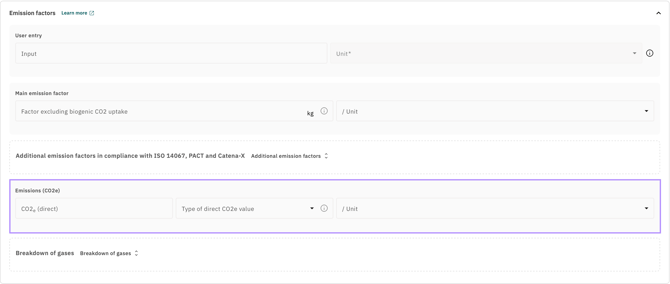
The entered CO₂e value can then be specified more precisely using the "Type of direct CO₂e entry" dropdown. The following options are available:
- CO₂e (excl. biogenic CO₂ uptake): Contains fossil and biogenic emissions, but not the biogenic CO₂ uptake by biomass.
- CO₂e (incl. biogenic CO₂ uptake): Extends the value by the biogenic CO₂ uptake by biomass.
- CO₂e (fossil): Exclusively the fossil share of emissions.
- CO₂e (biogenic): The biogenic share, consisting of biogenic emissions and the CO₂ uptake by biomass.
3. Entry of individual gases
In addition to entering overall CO₂e values, it is possible to record the direct emissions of an activity at the level of individual greenhouse gases. This enables more detailed reporting and increases the transparency of the PCF. The section can be expanded and collapsed using the "Individual gases" button.
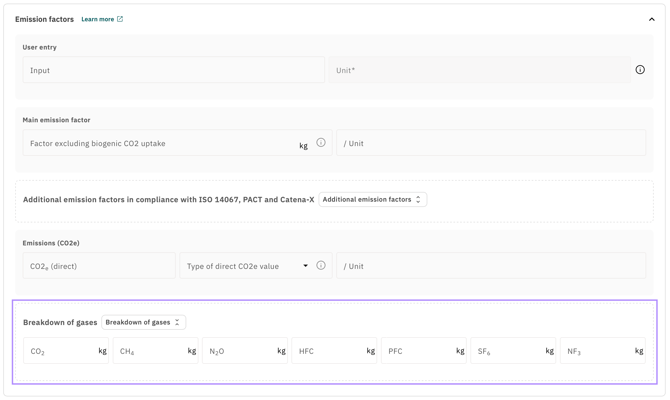
The entry of individual gases is optional. If no value is entered, the respective field remains empty – no default value is assumed. The following greenhouse gases can be recorded in the unit kg:
| Gas | Description |
| CO2 | Carbon dioxide |
| CH4 | Methane |
| N2O | Nitrous oxide |
| HFC | Hydrofluorocarbons |
| PFC | Perfluorocarbons |
| SF6 | Sulphur hexafluoride |
| NF3 | Nitrogen trifluoride |
The individual gases refer exclusively to direct emissions. Upstream emissions are not recorded here. There is no validation logic between the individual gases and the overall CO₂e value – both entries are independent of each other.
4. Data source information
The following data source details apply to both the emission factor entry and the direct CO₂e entry. When entering emission factors, the same source should be used for all four factors to ensure methodological consistency.
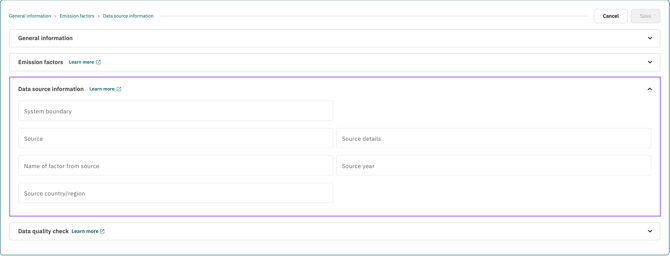
| Field | Description |
| System boundary | Describes which life cycle stage the emission factor covers (e.g. cradle-to-gate). Important for comparability with other emission factors. |
| Source | Name of the database or supplier used, e.g. ecoinvent. |
| Source details | The name of the source can be specified in more detail, e.g. by providing a database version. |
| Name of factor from source | Original name of the emission factor according to the specified source. |
| Source year | Publication or reference year of the data source. |
| Source country / region | Country or region from which the material is sourced or the activity is obtained. Relevant because emission factors can vary depending on the geographic context. |
5. Activity-Based Emission Factor Search
In addition to manual entry, the Climate Hub offers the option to search for emission factors via the external database climatiq and import them directly. The search is started using the "Search factor (activity based)" button.
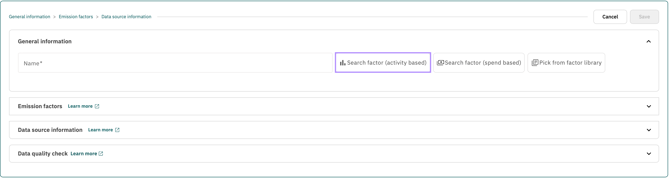
As of May 2026, Climatiq contains around 458,000 emission factors from 64 different databases. When importing an emission factor, the choice of database is decisive:
Option 1: ecoinvent (recommended for standards-compliant reporting)
When selecting an ecoinvent factor, all four fields are automatically populated – Factor (fossil), Factor (biogenic), Factor (excl. biogenic CO₂ uptake) and Factor (incl. biogenic CO₂ uptake). Only ecoinvent provides this complete breakdown within a consistent system boundary. We therefore strongly recommend using ecoinvent if you wish to report in accordance with ISO 14067, PACT, Catena-X or TfS. Please note that ecoinvent is a paid database.
Option 2: Other databases
When selecting another database, only the Factor (excl. biogenic CO₂ uptake) is imported. The fields Factor (fossil), Factor (biogenic) and Factor (incl. biogenic CO₂ uptake) remain empty, as these databases currently do not provide a biogenic breakdown. However, these factors are required for a complete standards-compliant balance sheet.
Further details on conducting the search and importing emission factors can be found in this article.
6. Spend-Based emission factor search
The Climate Hub also enables the search and selection of emission factors based on cost data. The search is started using the "Search factor (spend based)" button. For these spend-based emission factors, currency conversions and inflation adjustments are automatically taken into account, compensating for temporal and regional differences between the factor and the actual activity.
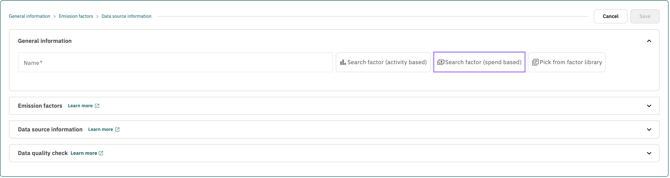
Please note! As ecoinvent does not provide spend-based emission factors, only the Factor (excl. biogenic CO₂ uptake) is populated when using spend-based emission factors. For a complete biogenic breakdown in accordance with ISO 14067, PACT, Catena-X or TfS, we recommend the activity-based emission factor search with ecoinvent.
Information on researching and importing factors, the underlying methodology and a practical example can be found in this article.
7. Recording Electricity Consumption
For certain sub-stages, it is possible to record electricity consumption separately. An individual emission factor from the electricity provider represents the most reliable data source. If this is not available, a regional or country-specific electricity mix or green electricity can be used as an alternative.
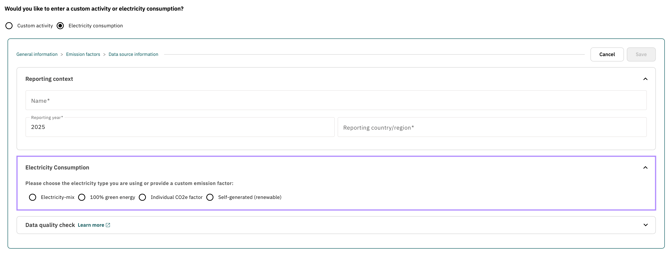
When selecting electricity mix or 100% green electricity, the year as well as the country or region must be specified. Based on this information, a suitable emission factor is automatically determined – both for direct emissions and for the upstream chain (analogous to CCF Scope 2 electricity). The upstream chain includes Well-to-Tank, Transmission and Distribution, and Well-to-Tank of Transmission and Distribution. In the Climate Hub, these values are combined into an overall factor and an overall value in kg CO₂e for clarity.
When selecting an individual CO₂e factor, an emission factor must additionally be entered manually and optionally documented with a source. In this case, direct emissions are calculated using the individual factor, while the upstream chain continues to be determined based on the specified year and country/region.
As a fourth option, self-generated electricity from renewable energy sources can be recorded. Only the electricity consumption and the corresponding unit need to be entered. The emission factor is set to 0 g/kg in this case, as electricity generation from renewable sources by definition does not cause any direct CO₂ emissions.
Please note! When using the electricity module, only the Factor (excl. biogenic CO₂ uptake) is populated. For a complete biogenic breakdown, we recommend recording electricity consumption alternatively via the activity-based emission factor search using an ecoinvent factor.
8. Selecting a predefined activity
If you do not have your own emission factor available, you can use one of our predefined standard activities with stored emission factors. The stored emission factor is automatically applied to the entered consumption value. This is quick and easy – ideal for common use cases and saves time when researching suitable emission factors.
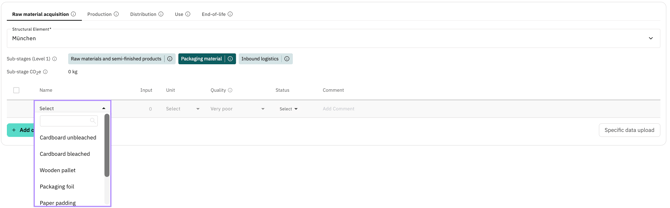
For certain activities, emission factors for upstream processes (upstream emissions) are stored where provided by the source. If such data is available, it is automatically taken into account and added to the overall emission value.
Please note! When using predefined activities, currently only the Factor (excl. biogenic CO₂ uptake) is populated. For a complete biogenic breakdown in accordance with ISO 14067, PACT, Catena-X or TfS, we recommend recording the activity via the activity-based emission factor search with ecoinvent, or entering the emission factor manually.
9. Further Information
For all emission sources, consumption values can be recorded in the "Input" column and the respective unit selected. Emissions are calculated automatically. For quick reference, the total sum of all emissions for the respective sub-stage is displayed in the top right corner.
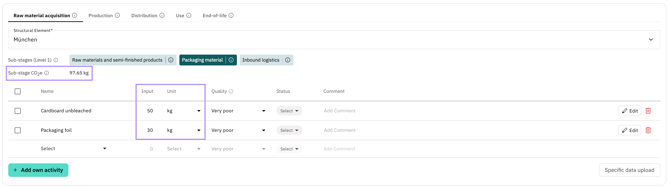
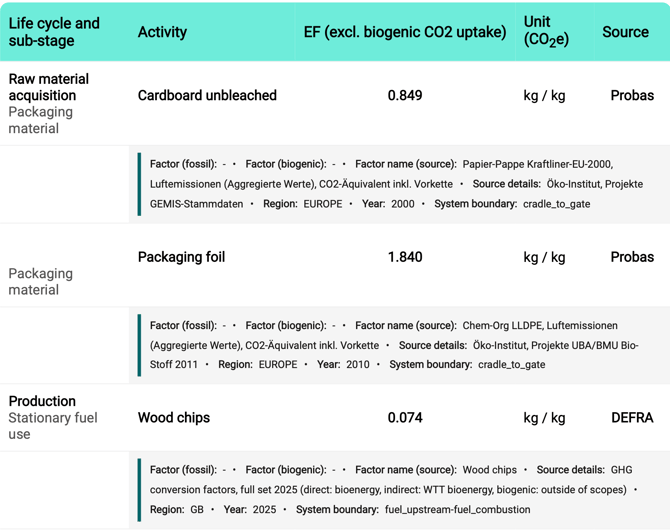
For all added activities, the emission factor used including the source is transparently reported in the PDF report.