![VERSO_Logo-1.png]](https://helpdesk.verso.de/hs-fs/hubfs/Globale%20Design-Elemente/VERSO_Logo-1.png?height=50&name=VERSO_Logo-1.png)
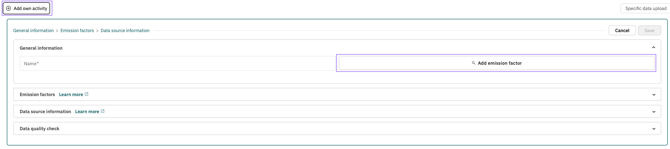
To add your own activity in Scope 3, click the add emission factor button in the input form. The search window always opens on the Emission factor tab first, where your individual factors are stored. At the top of the search window, you can switch to spend-based. Only emission factors that can be automatically adjusted for currency adjustments and inflation are available here. This compensates for deviations between the period and region of the factor and the actual activity.
Procedure
Click the add emission factor button and switch to the spend-based tab.
Here you can search for and select spend-based activities. You can display the complete selection list or search for keywords. The keywords access both the dropdown list and the detailed description. Once you have found a suitable activity, please enter the currency (unit) and the country in which the activity was performed. If this country is not known, you can alternatively select the country of use. You can also give the activity your own name (name).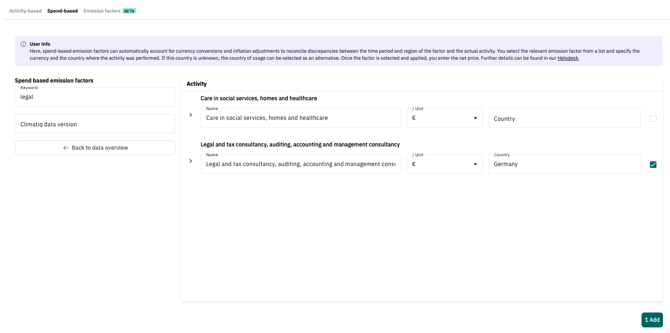
After the desired activity has been selected and accepted with the check mark please enter the net price in the next step. The net price is the price of a product or service excluding VAT or other taxes. The emissions will then be calculated automatically. This can be viewed in the display in the top right-hand corner for an initial assessment.
In addition, a color symbol may indicate whether all invoices have been taken into account. The text appears when hovering.


- The inflation adjustment was made only partially and not for the entire period.
- Access was made to a factor from a larger geographical region, as no emission factors are available in the original region.
- No inflation adjustment could be made.
- No emission factor with these criteria could be found. Please change the region.
Click the Edit button (pencil icon) at the end of the activity row to view additional information about your activity and make changes if needed. Please note that the Name field has a character limit. Choose a descriptive title that best represents your activity. To improve transparency, the “Name of factor from source” field now includes an info icon. When you hover over the info icon or anywhere over the field, a tooltip displays the originally selected spend-based activity.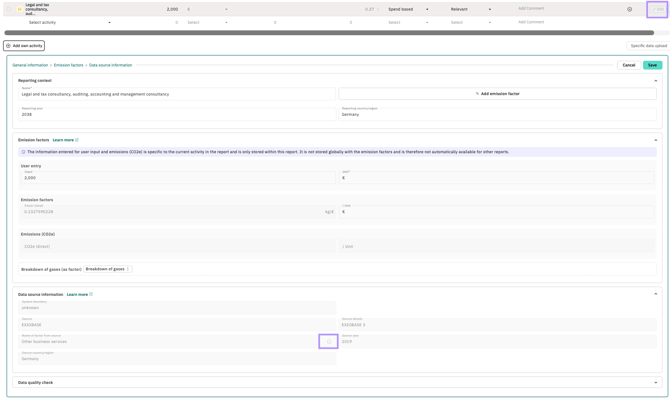
Methodology
The spend-based emission factors are taken from the EXIOBASE database, which is based on environmental-economic input-output models. They are available via the climatiq interface and are structured according to economic sectors in accordance with NACE Rev. 2 codes (Statistical Classification of Economic Activities in the EU; European Communities, 2008, ISSN 1977-0383).
If expenditure was incurred in a year other than the reference year of the underlying emission factor, climatiq automatically adjusts the expenditure totals by:
- Inflation adjustment to align with the price level of the reference year,
- Currency conversion based on the corresponding historical exchange rates.
Currency conversion is performed automatically using data from the UN Treasury, the US Internal Revenue Service (IRS) and the World Bank. Inflation rates are taken from industry-specific statistics from Eurostat. This combination ensures a robust, internationally comparable and methodologically sound adjustment of expenditure values for emissions calculation.
A detailed description of climatiq's methodology can be found here.
Example
The emission factor 'construction work' is assigned to the NACE codes 41 'Construction of buildings', 42 'Civil engineering', and 43 'Specialised construction activities' (including groups and classes). The factor is defined for Germany, but only for the year 2019. In the Climate Hub, these three NACE codes are grouped into a single selection component: 'Construction: maintenance, installations (e.g. electrical, water), completion and finishing (e.g. locksmiths, painters), building construction, civil engineering'. The consolidation of consistent emission factors makes the selection easier and provides better readability.

You can now select the currency, e.g., Euro, and enter the country, e.g., Germany. If you're creating a report for 2023 and enter, for example, €100, an inflation rate of approximately 22.03% will be automatically applied. The adjusted Euro value (€81.94), multiplied by the available factor (0.4011 kgCO2e/€), results in a CO2e value of 32.87 kg. This value will appear as 0.03 t in the Climate Hub.

Specification of spend-based emission factors in the PDF report
Please note that in your CO2 report (PDF), the emission factor used may be adjusted for inflation and currency. However, the original source reports only unadjusted values. This is also indicated with an asterisk.