![VERSO_Logo-1.png]](https://helpdesk.verso.de/hs-fs/hubfs/Globale%20Design-Elemente/VERSO_Logo-1.png?height=50&name=VERSO_Logo-1.png)
Note: Spend-based search is available under the ISO 14067 standard. When Catena-X or PACT is activated, this function is not available, as ecoinvent does not provide spend-based emission factors.
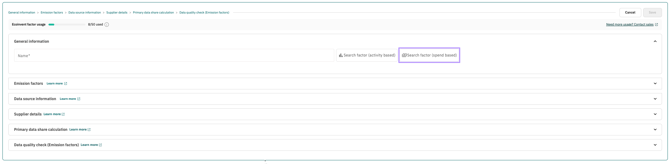
To add a custom activity in the PCF, you can use the "Search factor (spend based)" button. This button allows you to automatically adjust your factors for currency conversions and inflation, compensating for differences between the time period and region of the factor and the actual activity. Alternatively, the search for activity-based emission factors is available.
How to Proceed
Click the "Search factor (spend based)" button.
A new window opens in which you can search for and select spend-based activities. You can display the complete selection list or search by keywords. The keywords apply to both the selection list and the detailed description. Once you have found a suitable activity, please enter the currency (unit) and the country in which the activity was carried out. If this country is not known, the country of use can be selected as an alternative. You can also give the activity a custom name.
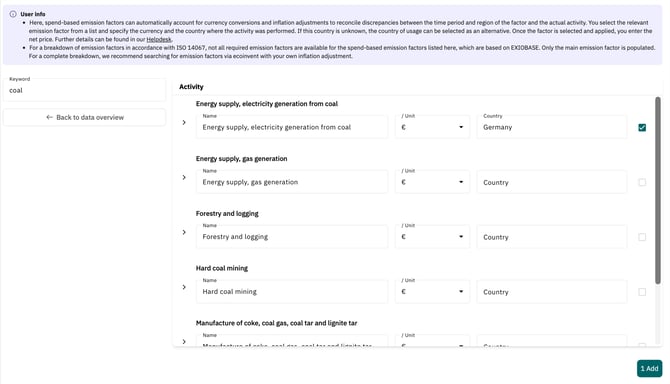
After the desired activity has been selected and confirmed with the checkmark, please enter the net price in the next step. The net price is the price of a product or service excluding VAT or other taxes. Emissions are then calculated automatically and can be viewed for an initial assessment in the display in the top right corner.
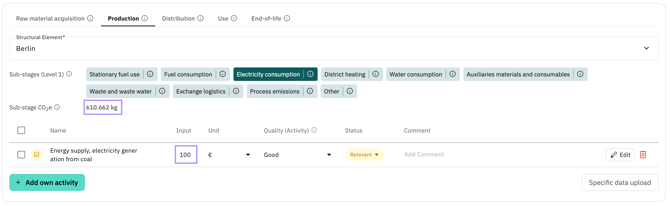
In addition, a colour indicator may be displayed to show whether all invoices have been taken into account. The text appears on hover:
- The inflation adjustment was only partially applied and not for the entire period.
- A factor from a larger geographic region was accessed, as no emission factors are available in the original region.
- No inflation adjustment could be applied.
- No emission factor could be found with these criteria. Please change the region.

Using the Edit button (pencil icon) at the end of the activity row, you can view further information about your activity and make changes if necessary. Please note that the Name field has a character limit. Enter a meaningful title here that best describes your activity.
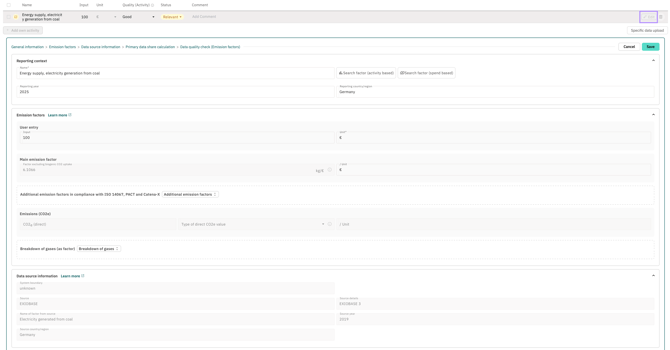
Please note! As ecoinvent does not provide spend-based emission factors, only the Factor (excl. biogenic CO₂ uptake) is populated when using spend-based emission factors. For a complete breakdown, we recommend searching for emission factors via ecoinvent with your own inflation adjustment.
Methodology
The spend-based emission factors are sourced from the EXIOBASE database, which is based on environmentally extended input-output models. They are available via the Climatiq interface and are structured by economic sector according to NACE Rev. 2 codes (Statistical Classification of Economic Activities in the European Community; European Communities, 2008, ISSN 1977-0383).
If expenditures were incurred in a different year than the reference year of the underlying emission factor, Climatiq automatically adjusts the expenditure amounts by:
- Inflation adjustment to align with the price level of the reference year,
- Currency conversion based on the corresponding historical exchange rates.
Currency conversion is performed automatically using data from the UN Treasury, the US Internal Revenue Service (IRS) and the World Bank. Inflation rates are sourced from sector-specific statistics from Eurostat. This combination ensures a robust, internationally comparable and methodologically sound adjustment of expenditure values for emissions calculation.
A detailed methodology description from Climatiq can be found here.
Example
The emission factor "construction work" is assigned to NACE codes 41 "Construction of buildings", 42 "Civil engineering" and 43 "Specialised construction activities" (including groups and classes). The factor is defined for Germany, among other countries, but only for 2019. In the Climate Hub, these three NACE codes are combined into a single selection component: "Construction: maintenance, installations (e.g. electrical, plumbing), finishing (e.g. metalwork, painting), building construction, civil engineering". Grouping under the same emission factors simplifies the selection and improves clarity.
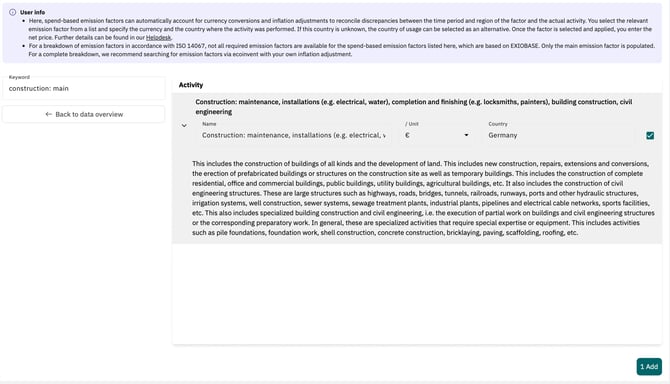
You can now select the currency, e.g. Euro, and enter the country, e.g. Germany. If you are currently creating a report for 2023 and enter e.g. €100, an inflation rate of ~22.03% is automatically applied. The adjusted Euro value (€81.94), multiplied by the available factor (0.4011 kg CO₂e/€), results in a CO₂e value of 32.87 kg.
Reporting Spend-Based Emission Factors in the PDF Report
Please note that in your CO₂ report (PDF), the emission factor used may be adjusted for inflation and currency. However, only unadjusted values are shown in the original source. This is indicated accordingly with an asterisk in the report.