
- Release Notes
- Climate Hub
- Release 1.43.0 - December 15th, 2024
-
ESG Hub incl. DMA
-
Climate Hub
- Release 2.7.0 - December 8th, 2025
- Release 2.6.0 - November 26th, 2025
- Release 2.5.0 - November 17th, 2025
- Release 2.4.0 - October 29th, 2025
- Release 2.3.1 - October 21st, 2025
- Release 2.3.0 - October 7th, 2025
- Release 2.2.1 - September 25th, 2025
- Release 2.2.0 - September 22nd, 2025
- Release 2.1.4 - September 4th, 2025
- Release 2.1.3 - September 1st, 2025
- Release 2.1.1 - August 18th, 2025
- Release 2.1.0 - July 25th, 2025
- PCF Release 2.00.0 - July 15th, 2025
- CCF Release 2.00.0 - July 15th, 2025
- Release 1.54.5 - June 27th, 2025
- Release 1.54.4 - June 20th, 2025
- Release 1.54.3 - June 13th, 2025
- Release 1.54.2 - June 5th, 2025
- Release 1.54.1 - June 4th, 2025
- Release 1.54.0 - June 3rd, 2025
- Release 1.53.0 - May 16th, 2025
- Release 1.52.0 - April 29th, 2025
- Release 1.51.0 - April 17th, 2025
- Release 1.50.0 - April 11th, 2025
- Release 1.49.0 - April 4th, 2025
- Release 1.48.3 - March 26th, 2025
- Release 1.48.2 - March 14th, 2025
- Release 1.48.1 - March 7th, 2025
- Release 1.48.0 - February 27th, 2025
- Release 1.47.0 - February 14th, 2025
- Release 1.46.0 - January 30th, 2025
- Release 1.45.0 - January 17th, 2025
- Release 1.44.0 - January 14th, 2025
- Release 1.43.0 - December 15th, 2024
- Release 1.42.0 - December 2nd, 2024
- Release 1.41.0 - October 2nd, 2024
- Release 1.40.0 - September 5th, 2024
- Release 1.39.0 - August 14th, 2024
- Release 1.38.0 - August 2nd, 2024
- Release 1.37.0 - July 25th, 2024
-
Supply Chain Hub
Copy of reports with activity data possible
December 15th, 2024
With this release, you have the option of creating a copy of your reports for the same year, either with or without activity data. To do this, click on the icon with the two overlapping rectangles in the navigation bar in the Accounting module. Copying to the same year is set by default. You can now select whether you want to create the report for a year or a month. You can also choose whether you want to copy the activity data or not.
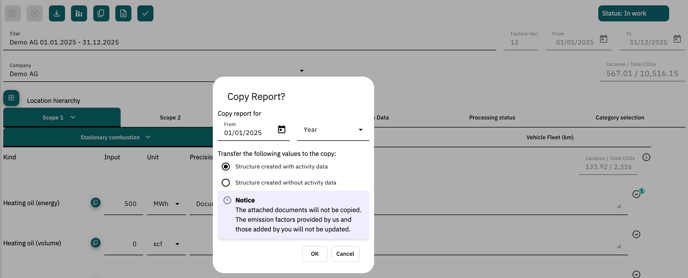
Create a report copy with activity data:
A 1:1 copy takes place, in which all previously entered values are transferred. Please note that the predefined and customer-specific emission factors are copied, but are not updated to the current version. Furthermore, attached documents are not transferred to the copy.
Create a report copy without activity data:
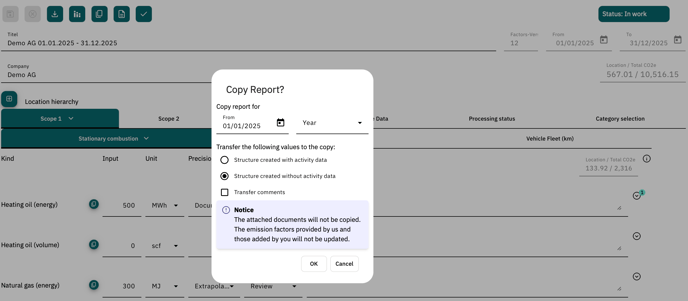
If you do not want to transfer your activity data, a copy of the structure of your previous report will be created, but the consumption values will be reset to zero. Here you can select whether the comments associated with the activity data and categories should be copied or not. Please note that the predefined and customer-specific emission factors are copied, but are not updated to the current version.
Please note that when copying reports into a new year, activity data cannot be transferred!
Please find more information on how to copy your reports in our Helpdesk.