![VERSO_Logo-1.png]](https://helpdesk.verso.de/hs-fs/hubfs/Globale%20Design-Elemente/VERSO_Logo-1.png?height=50&name=VERSO_Logo-1.png)
TABLE OF CONTENTS
I. Sending a PPWR Readiness request
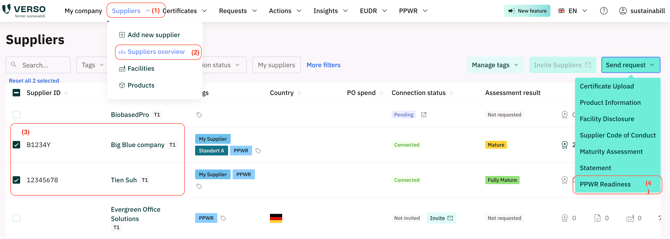
- Go to "Suppliers".
- Select "Suppliers overview".
- Select the supplier companies you want to send a request to (This is only possible if the supplier is registered)
- Click on "Send Request".
- Select the PPWR Readiness request type to send to your suppliers.
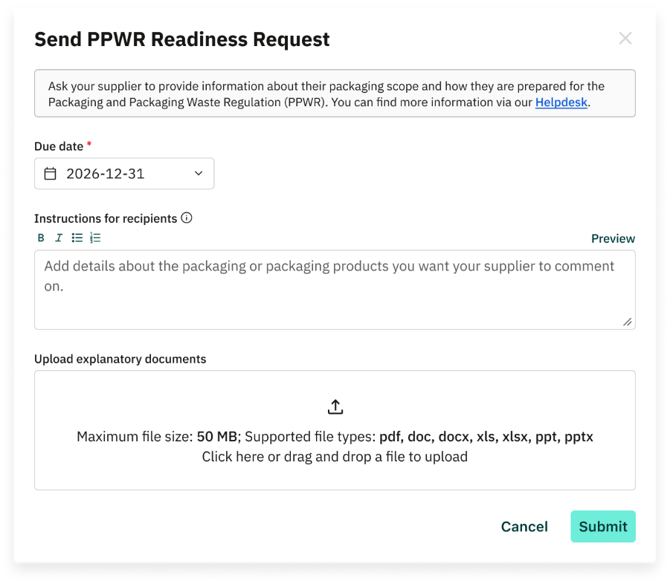
Once you have completed all steps and selected "PPWR Readiness" after clicking the "Send Request" button as described in the above article, proceed as follows to submit the request and send it to your suppliers.
Optional steps:
- Change the due date if necessary (14 days per default).
- Add Instructions for your suppliers. In the instructions, you could describe why you want the supplier(s) to make a statement about the company’s PPWR Readiness. Keep in mind to enter the instructions in multiple languages, if necessary.
- You can upload explanatory documents, for instance regarding the packaging scope you want the supplier(s) to care attention to by answering the request. This document will be shared with all selected suppliers.
- Click on "Submit".
II. Once the request is sent
- Your suppliers will receive an email notification to complete the request.
- You will be able to access the sent requests by navigating to "Requests" >> "Sent" and then filtering for "Request Type" = PPWR Readiness
Once the request is completed by your suppliers, you can access the results:
- In the "Requests" >> "Sent" menu by clicking on "See requests results" in the details of each supplier's completed request.
-
You can unlock the request after clicking on "See requests results" if you want your suppliers to correct or complement the information they provided; your suppliers then have the possibility to edit the information and submit the request again
III. Details of the request from the perspective of the recipients
To see the Statement request from your supplier's point of view, please click on the following link to see the article: How to answer a PPWR Readiness request