![VERSO_Logo-1.png]](https://helpdesk.verso.de/hs-fs/hubfs/Globale%20Design-Elemente/VERSO_Logo-1.png?height=50&name=VERSO_Logo-1.png)
Creating planned orders
With this function, you can send planned or collective orders to your suppliers. Your suppliers will be notified and can then fill in the required EUDR information. If you would rather collect EUDR information based on actual orders, please click here.
When are planned orders suitable?
A due diligence statement (DDS) can cover several deliveries, but it does not have to. Planned orders are particularly suitable if your supplier already has the goods in stock and it is already certain that they will deliver this stock to you over the planning period.
According to the European Commission’s FAQ, a DDS covering several deliveries is subject to the following conditions. They apply to the company submitting the DDS:
- Total quantity in advance: The total quantity is stated in the DDS before the first delivery is placed on the market.
- New DDS for additional quantities: Once the stated quantity has been used up, a new DDS is required for any further quantities.
- One year at most: The DDS should cover deliveries over a period of no more than one year from its submission.
- Commodities already produced: In principle, the commodities should already have been produced when the DDS is submitted, i.e. for wood products such as paper, the wood should already have been harvested. The final product itself does not yet need to have been manufactured.
- No double declaration: The same goods must not be included in several DDS submitted by the same company.
- Quantity reconciliation: Any differences between the declared quantity and the quantity actually delivered must be documented and kept for five years.
- File size: A DDS, including geolocation data, must not exceed 25 MB.
- Increased risk: If an authority identifies non-compliance, its measures may apply to all deliveries covered by this DDS.
If these conditions are not met, please use Option 2: Transactional orders.
1. Go to "EUDR" in the main menu.
2. Select "Products".
3. Select "Inbound Products".
4. Make sure that for all "Inbound Products" a planned quantity and the according planning period is entered, only then it is possible to create a planned order. You can either do this via
- Bulk Upload: Select "Upload Products" -> Upload the excel template for all the available inbound products with the added planned quantity and the according planning period.
- Manual Upload: Click on "Add product" and fill out the form. For existing inbound products click on the pen next to the product ID and enter the missing planned quantity and the according planning period.

4. Click on "Submit" in the column "Submit to supplier".

A new pop-up will open:

5. If you are importing goods from outside the EU, make sure to adjust the toggle accordingly.
6. You can adjust the planned quantity again.
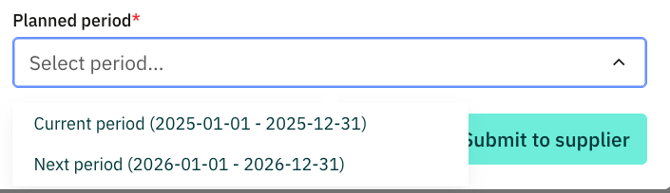
7. Select the "Planned period" as you can distinguish between current period or next period.
8. Select the "Submit to Supplier" to notify your supplier
A new planned order will be created under the EUDR menu "Transactions > Inbound Transactions" and the supplier will be requested to import their data.

Your suppliers will receive an email notification to import their data
For general information on EUDR, please read the following article: What is the EUDR?