![VERSO_Logo-1.png]](https://helpdesk.verso.de/hs-fs/hubfs/Globale%20Design-Elemente/VERSO_Logo-1.png?height=50&name=VERSO_Logo-1.png)
Under the ‘Prepare’ section, select the relevant topics on which you will be reporting. These form the basis for your data collection, regardless of the standard you choose.
Here, you also have the option to access the ‘Double Materiality’ module on VERSO, provided you have subscribed to it. To do this, click on ‘Double Materiality’ and log in to the module to carry out your double materiality analysis and incorporate the results into your report.
Even if you have already identified your relevant topics by other means, these must be added under the ‘Topics’ sub-section as follows.
Under ‘Topics’, select your relevant topics by clicking on the ‘plus’ icon on the right hand side. Please note that you can also expand the menus on the left to select relevant topics at the sub-topic level.You should select material topics; additional topics may also be selected.
Please don’t forget to save your changes.
Material Topic selection
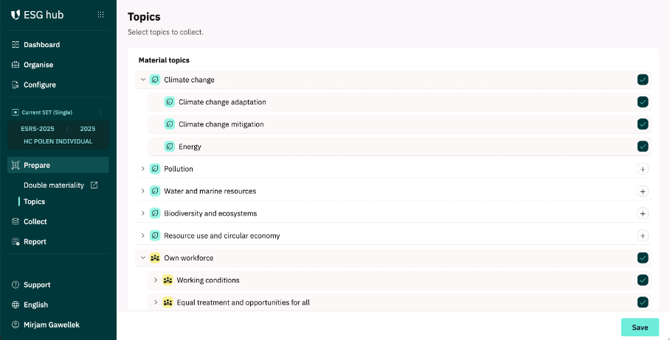
The topics you select will then determine the associated data points displayed under the ‘collect’ section further down.
Please complete this preparation first before you begin data collection within ´collect´.