![VERSO_Logo-1.png]](https://helpdesk.verso.de/hs-fs/hubfs/Globale%20Design-Elemente/VERSO_Logo-1.png?height=50&name=VERSO_Logo-1.png)
In the Company tab, the reporting company creates a company profile and fill it with information. This must be done before the report is created and the corresponding data is entered.
Step 1: Create company
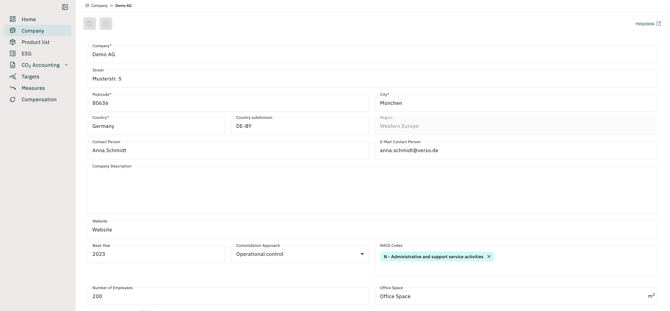
Use the navigation bar to create a company profile under Company. Enter the company name and address here. Then select a country and a country subdivision from the provided dropdown menus. You can also add a contact person, company description, website, base year, consolidation approach and NACE codes.
Step 2: Add structural elements
Once the parent company has been created, add structural elements by clicking the "+" at the bottom left of the page. Add as many sites as you need. Please note the limit on the possible number of sites set by your license. If required, you can request additional structural elements from our sales team.

Step 3: Name the structural elements
Using the dropdown for each structural element, either select an existing structural element or add a new one via <Add new structural element>. For a new structural element, type the name as free text. In the Equity Share input field, indicate whether a structural element only partially belongs to the parent company: enter either the percentage share for partial ownership or 100% for full ownership. To save a structural element, click the save icon to the right of the structural element's name. Then click the save button at the top left to save all the information you have entered.

Step 4: Add information to the structural element
To assign further information to individual structural elements, click the green button behind the desired structural element after saving your progress. A form opens analogous to the creation of the parent company. You can proceed here exactly as described from Step 1 onwards.
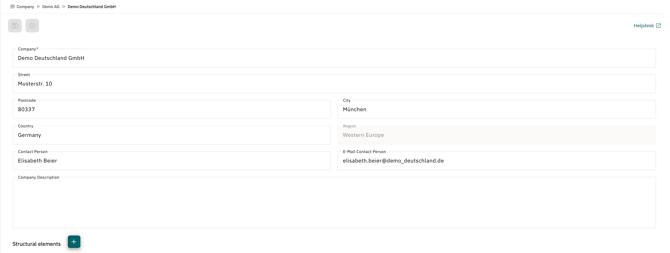
Sub-sites and subsidiaries can also be added to these structural elements. To do so, repeat the process from Step 4.
Important note: Please ensure that you have correctly entered your company structure in the system before creating a report.