![VERSO_Logo-1.png]](https://helpdesk.verso.de/hs-fs/hubfs/Globale%20Design-Elemente/VERSO_Logo-1.png?height=50&name=VERSO_Logo-1.png)
Under the Add own activity button, you can manually enter your data. Alternatively, you can automate data entry using the specific data upload function.
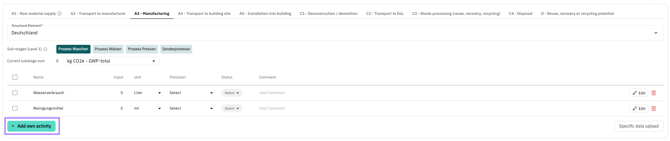
1) Creating activities
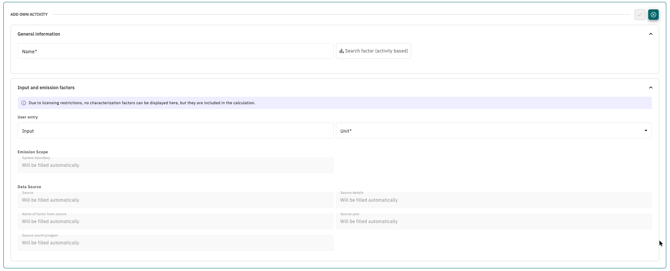
1.1) Creating an activity without characterization factors
Assign a unique name to the activity. Under User entry, you can enter the consumption value and select the unit. You can then save the activity; all characterization factors will initially be set to "0" in the calculation.
1.2) Creating an activity with characterization factors
If you want to assign an LCA dataset to the activity directly, click the Search factor (activity based) button. There, you can search for datasets from ecoinvent version 3.12 and apply them directly. Currently (as of April 2026), around 26,500 datasets are available.
The characterization factors are always based on the EN 15804 Cumulative LCIA model. Due to licensing restrictions, characterization factors from ecoinvent cannot be displayed, but they are fully included in the calculation.
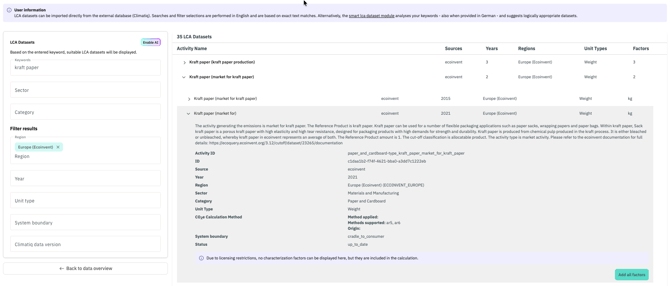
When clicking the button, a new window opens. By default, manual search is activated, but you can switch to AI-supported search at any time.
1.2.1) Manual Search
Here you can search for keywords. The search results, based on exact text matching, can be filtered according to the following criteria: country (Region), year (Year), unit (Unit Type) and system boundary (System boundary). Emission factors can also be pre-grouped by categories (e.g. building materials) and sectors (e.g. buildings and infrastructure), making it easier to browse through factors without needing to know the exact factor name.
1.2.2) AI-assisted search
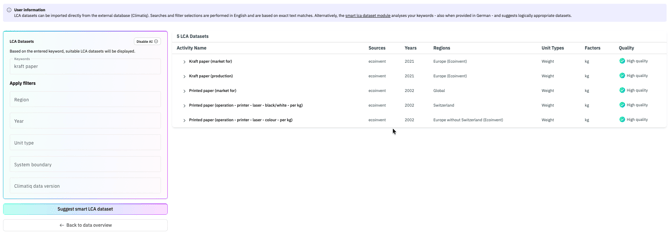
You can switch to smart mode by clicking the Enable AI button. In this mode, you can also search for keywords in English. The five displayed search results are based on logical relationships.
Note to keyword: can be provided in German or English, or in any of the following languages: Bulgarian, Czech, Danish, Dutch, Estonian, Finnish, French, Hungarian, Irish, Italian, Latvian, Polish, Slovak, Spanish, Swedish, Mandarin Chinese; automatically translated into English if needed.
After confirming via Suggest smart LCA dataset, the five best suggestions are displayed. A green icon indicates a high mapping quality between the entered activity and the suggested dataset, while an orange icon indicates low mapping quality.
2) Next steps
Once you have found a suitable dataset, you can apply it in both manual and AI-assisted search to the Climate Hub by clicking on add all factors. All relevant information that is important for traceability is then displayed in the Climate Hub. There you also have the option of giving the activity its own name.
Please note that when applying a dataset from the AI-assisted search, the AI logic is reset. This means the remaining four suggestions are not saved, and there is no longer a connection to the original AI search.
By clicking the checkmark, the activity appears in the overview and the company can enter its consumption values in the input column and select the unit of the input value. The input value is automatically multiplied with the characterization factors. For quick orientation, the dropdown displays the sum of emissions for each phase or sub-phase per impact category. By default, the category GWP-total in kg CO₂e is selected.

3) Further information
- Details on ecoinvent can be found on the official website.
- Documentation of the AI interface can be found here.
Risks when using the AI function
Using the AI-assisted emission factor search may lead to inaccurate or incomplete results, especially if keywords are unclear or ambiguous. Regional differences or newer data sources may also be disregarded. Therefore, all AI suggestions should be carefully reviewed before being used in reports or decision-making. Responsibility for the final selection of the emission factor always lies with the users.