![VERSO_Logo-1.png]](https://helpdesk.verso.de/hs-fs/hubfs/Globale%20Design-Elemente/VERSO_Logo-1.png?height=50&name=VERSO_Logo-1.png)
TABLE OF CONTENTS
I. Component mapping
Before you can create component mappings, both your components (see: How do I upload my (packaging) components?) and your packaging units (see: How do I upload my packaging units?) must be created in the system.
To map components to the corresponding packaging units, navigate to PPWR > Packaging units.
Click on "Upload component mappings".- Download the Excel template via "Download the template".
- Fill in the template. In the "Read-Me" tab, you will find detailed notes on the individual columns and the required information.
- Upload the completed template and then click on "Upload mapping" to import the mappings.
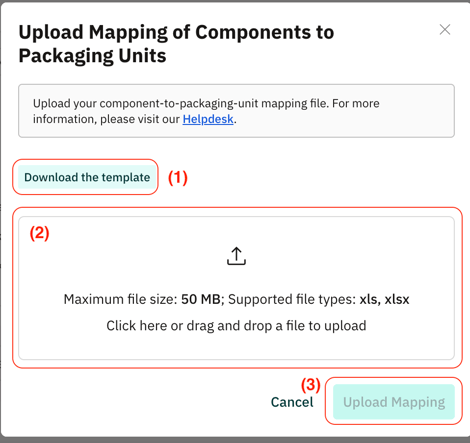
After a successful upload, the components defined in the template are mapped to the corresponding packaging units.
II. Packaging mapping
Mapping products to packaging units is optional. It allows you to associate packaging information with specific products and to run product-related analyses within the scope of the PPWR.
Before you can create product mappings, both your products (see: How do I upload my PPWR products?) and your packaging units (see: How do I upload my packaging units?) must be created in the system.
To map products to the corresponding packaging units, navigate to PPWR > Products.
Click on "Upload packaging units mappings".- Download the Excel template via "Download the template".
- Fill in the template. In the "Read-Me" tab, you will find detailed notes on the individual columns and the required information.
- Upload the completed template and then click on "Upload mapping" to import the mappings.
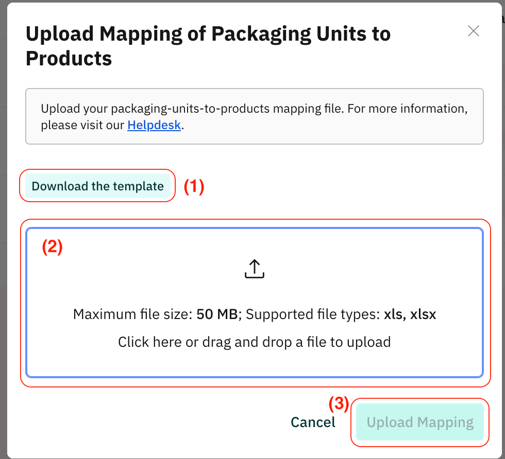
After a successful upload, the products defined in the template are mapped to the corresponding packaging units. This allows the packaging information to be associated with the respective products within the PPWR documentation and to be analysed.